STARFACE Client
Working with your mobile phone feels like being in the office.The STARFACE Client provides fast access to
- call lists,- contacts,- voicemail and - call redirections.
### SUPPORT ###Tutorial: http://support.o-byte.com/x/JwAOE-Mail: [email protected]: http://www.o-byte.com
Check your missed calls while on your way - the missed calls at your office, that is.
Or access the list of received calls and continue a conversation you just ended at your office - with just a few clicks.
With this easy access to your STARFACE PBX you have multiple possibilities to start a call right from your contacts or call lists.
You can
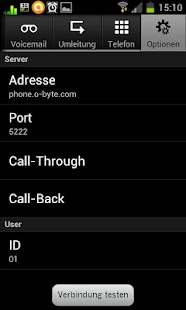
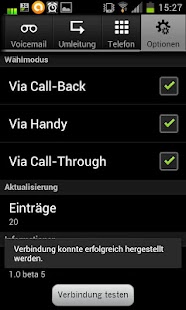
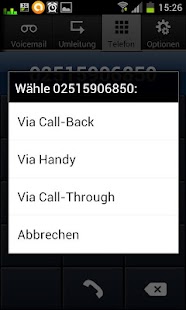
- call using your mobile service provider,- use Call-Through,- or make use of Call-Back (without mobile charge).
Its your decision with every call you make whether you want to use your mobile connection or call "through your STARFACE".
Respectively, if calling via Call-Through or Call-Back, the callee wont even see your mobile number but your office number - just as though youre sitting at your desk.
For your business partners and customers its completely non-transparent whether youre at your office or on your way.
In combination with STARFACE iFMC you can basically move your office into your mobile phone.
Moreover, adjust your call redirections from your mobile phone.
Whenever an unexpected appointment lets you run out of your office, you can just redirect your calls to your mailbox or a colleague using the STARFACE Client.
And when someone actually left a message on your voicemail, you just click the voicemail button in the STARFACE Client and receive the messages youd like to hear.
And when youre done, you can even simply delete them.
### MORE STARFACE-SOLUTIONS ###Please see http://produktwelt.o-byte.com for more special solutions.
You do have your own idea?
Please let us know and we will develop your personal STARFACE-solution: [email protected].
About STARFACE Client
- Package name (App ID)
- com.obyte.starface
- Available on
- Google Play
- Price
- Free
- Version
- v1.0.4
Looking for the STARFACE Client APK?
The safest way to get STARFACE Client (com.obyte.starface) on your Android device is to install it directly from Google Play — you'll always get the latest official version, automatic updates, and no risk of modified or infected APK files from third-party sites.
Social Features
Connect and share with friends and the community.
Productivity Tools
Boost your productivity with powerful tools and features.
Parenting Tools
Track and manage your child's development and daily activities.
See STARFACE Client in Action
Frequently Asked Questions
Is STARFACE Client free?
Yes, STARFACE Client is free to download and install on Android through Google Play.
How do I install STARFACE Client on Android?
Open Google Play on your Android phone or tablet, search for STARFACE Client or tap the Google Play button on this page, then tap Install. The app downloads and installs automatically.
What is com.obyte.starface?
com.obyte.starface is the App ID (package name) of STARFACE Client on Google Play. Every Android app has a unique package name, and it is the safest way to verify you are installing the official app.
Is STARFACE Client safe to download?
Installing STARFACE Client from Google Play is the safest option: you get the official version, verified by Google Play Protect, with automatic updates. Avoid APK files from unofficial third-party sites.

Get STARFACE Client Today
STARFACE Client for Android — free download on Google Play.
Compatible with Android phones and tablets — available on Google Play.
Ask AI about this app
Get instant answers about features, tips and more from popular AI assistants.